
Blogs
Schema Markup for SEO: Types, Examples and Implementation
Author : Logicloop admin
Publish Date : 2026-07-28
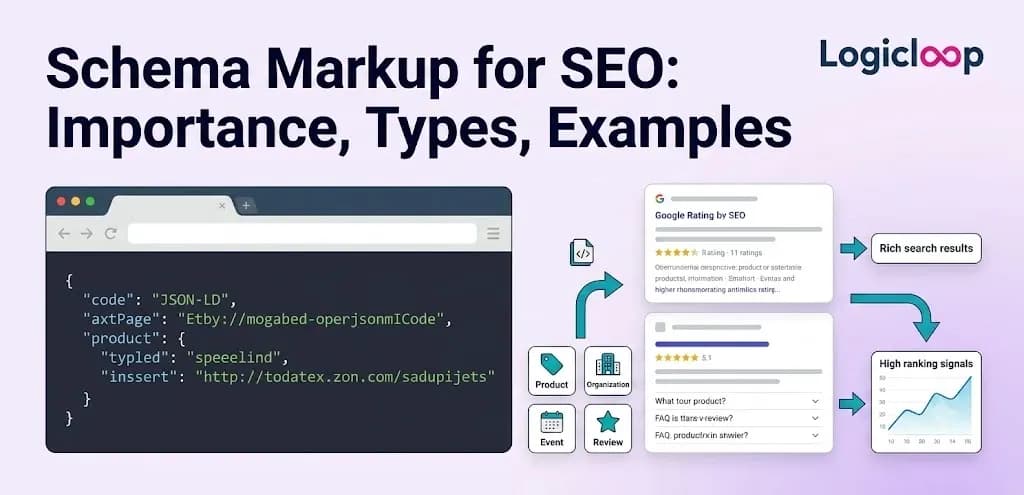
Here's a scene that plays out constantly. A food blogger publishes a chocolate chip cookie recipe. A few weeks later, a nearly identical recipe from a competing site starts showing up in Google with a star rating, a photo, the cook time, and the calorie count, all sitting right there in the results before anyone clicks. The original blogger's listing? A plain blue link and two lines of gray text. Same recipe, wildly different presentation. The difference almost always comes down to one thing: schema markup.
So what is it, exactly? Schema markup is a snippet of code you add to a page's HTML that tells search engines what the content actually is, in a format they can read without guessing. Rather than a crawler trying to work out whether "4.8" on your page is a price, a rating, or a random figure, the markup spells it out: this is a rating, out of 5, based on 212 reviews.
That labeled information is called structured data — data organized in a predictable, machine-readable way instead of buried in paragraphs of prose. Schema markup is one specific vocabulary for writing it, built on a shared standard called Schema.org, which Google, Microsoft, Yahoo and Yandex created together so every major search engine recognizes the same tags.
Key Takeaways
- Schema markup labels your content so search engines understand it instead of guessing, which can earn you rich results (star ratings, prices, FAQs, images) in the SERPs.
- It's not a direct ranking factor, but it lifts click-through rate and gives you more control over how your brand appears.
- JSON-LD is the format Google recommends and the sensible default for almost every site.
- Pick schema types based on what the page genuinely is — mismatched markup can trigger a manual penalty.
- Always validate with Google's Rich Results Test before and after you ship.
Why This Matters More Than People Think
Structured data used to feel like a niche technical chore reserved for developers. That's no longer true. By one estimate, roughly a third of Google's search results now include some form of rich snippet, so this has quietly become mainstream rather than a fringe optimization.
And the shift toward AI-driven search makes it more relevant, not less. When chat-based assistants summarize the web instead of just linking to it, clearly labeled facts are far easier for those systems to pull accurately. Fuzzy prose forces a machine to guess. Structured data hands it the answer.
How Search Engines Actually Read It
Crawlers already scan the HTML of every page they index. The problem is that plain text is ambiguous. A number could be a price, a phone number, or a rating. A date could be a publish date or an event date. Schema markup kills that ambiguity by tagging each piece of information with a defined property, so a crawler doesn't have to infer that $299 is the price — the markup already says so.
Most schema today is written in JSON-LD (JavaScript Object Notation for Linked Data). It's a lightweight script block that sits in the page's head, self-contained and separate from the visible content.
Its big practical win is that you don't have to weave it through individual HTML tags. You drop one block in one place and it applies to the whole page, which also makes it friendlier for content that loads dynamically. Google has openly stated a preference for it, and it's now the default output of most SEO plugins and site builders.
The two older alternatives still exist:
- Microdata — added straight into your existing HTML tags with attributes like itemscope and itemprop, so it has to be threaded through the actual markup.
- RDFa — built to work across document types beyond standard HTML, though it shows up far less often on typical websites now.
When any of these is implemented correctly and Google decides the content qualifies, that structured data can trigger a rich result (also called a rich snippet): a listing with extra visual elements — stars, product images, prices, FAQs, event dates — instead of the plain title-and-description most results get.
JSON-LD vs Microdata vs RDFa
For most sites built today, this isn't a close call. Here's the honest comparison.
| Format | Where it lives | Maintenance | Google's stance | Best for |
|---|---|---|---|---|
| JSON-LD | One <script> block in the head | Easy — edit in one place | Recommended | Almost every modern site |
| Microdata | Inline, inside visible HTML tags | Fragile — restructure the page and you can break it | Supported | Legacy setups already using it |
| RDFa | Inline attributes across documents | Similar effort to microdata | Supported | Non-HTML document ecosystems |
The takeaway is simple. Unless you've got a specific technical reason to do otherwise, JSON-LD is the default, and it's the format nearly every implementation tool now assumes.
The Schema Types Worth Knowing
There's no single "correct" list. Schema.org defines an enormous vocabulary — hundreds of types and well over a thousand associated properties, depending on which source you count from. Most sites only need a handful, chosen based on what each page is actually about.
Content and Publishing Schema
Running a blog or news site? Article schema (or its more specific cousin, BlogPosting) is usually the first one to add. It tells search engines the headline, author, publish date, and featured image — part of how pieces land in Google's Top Stories carousel or get an author byline in results.
Organization schema pairs naturally with it, identifying the publisher: business name, logo, contact details. That helps Google tie your content to a recognizable brand instead of an anonymous domain.
FAQPage schema deserves its own mention. It marks up a genuine question-and-answer format so individual questions can expand right in the results. It's also one of the types most closely tied to voice search — assistants like Google Assistant or Alexa can read a clearly labeled answer aloud without guessing which paragraph holds it. HowTo schema does the same for instructional content, breaking a process into numbered steps that can display in the SERP.
Commerce, Reviews and Local Business
Picture a small independent bakery. The owner adds LocalBusiness schema to the homepage and contact page — address, phone, opening hours, business category. That markup is a big reason the bakery's hours and location show up correctly when someone searches its name or types "bakery near me," rather than Google scraping whatever text happens to sit on the page.
E-commerce sites lean on Product schema, covering price, availability, and product identifiers so listings show pricing and stock status directly. Close behind is Review schema, which powers the star ratings under a listing.
One nuance worth getting right: a site that merely reviews or compares products it doesn't sell should use a product-snippet-style approach, not the merchant listing format meant for pages where a visitor can actually buy. Google treats those two cases differently, and blurring them causes problems.
Events, People and Jobs
- Event schema — concerts, webinars, conferences, with dates, locations, and ticket info.
- JobPosting schema — feeds openings into Google's dedicated job search experience, expanding a role's reach well beyond your own careers page.
- Person schema — smaller in scope but handy on author bios and professional profiles, tying credentials and social accounts to a named individual. That matters more and more for sites trying to show real expertise behind their content.
The Long Tail
Beyond the common ones, Schema.org supports plenty of narrower types built for specific industries:
- Recipe — a food blog can mark up cook time, ingredients, calories and ratings so a dish appears with all of it visible before a single click.
- BreadcrumbList — a quiet but genuinely useful one that maps your navigation hierarchy, so results show a page's location in the site instead of a raw URL.
- Book, Course, Dataset, SoftwareApplication, Movie, Video — each aimed at a particular content type.
None of these belong on every page. Add them only where the content genuinely matches the type.
What a JSON-LD Block Actually Looks Like
Theory only goes so far. Here's a short, valid Article example you could adapt — notice how each fact gets an explicit label:
<script type="application/ld+json">
{
"@context": "https://schema.org",
"@type": "Article",
"headline": "Schema Markup for SEO: Types, Examples and Implementation",
"author": {
"@type": "Person",
"name": "Jane Doe"
},
"publisher": {
"@type": "Organization",
"name": "Logicloop"
},
"datePublished": "2026-07-24"
}
</script>
Read it top to bottom and you'll see the logic. @type declares what the thing is, and every property after it hands Google a fact it would otherwise have to infer. That's the entire idea, scaled up to whatever your page needs.
The Actual SEO Payoff
Let's be clear about one thing, because it gets misunderstood constantly. Schema markup is not a ranking factor. Google has said so, and I'm not going to pretend otherwise. What it changes is how your listing looks and how much a searcher learns before clicking — and that has knock-on effects that absolutely matter.
The most direct one is click-through rate. A plain blue link competing against a result with stars, a price, and a thumbnail is at an obvious disadvantage, and that gap shows up in traffic even when rankings hold steady.
The upside can be dramatic in specific cases. SAP reported a 400% increase in clicks tied to rich results, and Sharp Healthcare saw an 843% increase within nine months of implementing schema, according to case studies cited by Schema App. Your mileage will vary, but the ceiling is high.
There are quieter benefits too:
- Knowledge Graph — structured data feeds the system behind those information panels beside search results, so consistent markup helps a brand or person build a more accurate profile over time.
- Control over representation — clearly labeled facts about your company are harder for search engines to misread or pull from an outdated, unofficial source.
- AI readiness — as chat-based tools summarize rather than link, labeled data is simply easier for them to extract correctly.
Pro Tip: Even flawless markup doesn't force Google to show a rich result. Eligibility sits with Google's algorithm and shifts over time as it changes which schema types trigger which features. Treat rich results as earned, not guaranteed.
How to Get Schema Onto a Site
Step by Step
- Identify what each page really is — an article, a product, a recipe, a local business page. Start from reality, not from a schema type you'd like to use.
- Choose the matching schema type, and check Google's Search Gallery to confirm it actually triggers a visible feature (not every Schema.org type does).
- Generate the markup — through a plugin, a tag manager, or by hand.
- Add it to the page, ideally as a JSON-LD block in the head.
- Validate with Google's Rich Results Test before you consider it done.
If You're on WordPress
This is usually the least painful part of the whole job. Plugins like Yoast SEO and Rank Math bake schema generation into the normal workflow. Rank Math, for example, lets you set default schema types for your content, then adjust the specific type on individual posts and pages without touching code. Plenty of other builders and e-commerce platforms now include similar built-in options for product and article pages.
If You're Doing It Manually
Sites without that plugin support add the JSON-LD script by hand, either directly in the HTML or through a tag manager. Google's Structured Data Markup Helper can generate a starter template by letting you tag elements on a page visually — a reasonable way to learn the syntax before writing it from scratch.
AI tools have also become a practical shortcut for drafting the code itself. Just don't ship the output blind; check it against the actual page content first.
Validation Is Not Optional
Whichever route you take, verify the result. Google's Rich Results Test checks whether your markup is eligible for a rich result and flags syntax errors or missing required fields. Tools like Semrush's Site Audit can scan a whole site at once instead of page by page. Run these checks after any redesign or CMS migration, too — those changes have a nasty habit of quietly breaking schema that used to validate fine.
Implementation Checklist
Run through this before you call any schema project finished:
- Confirm the schema type matches what the page genuinely is
- Use JSON-LD unless there's a specific reason not to
- Include all required properties for the type
- Only mark up content that's actually visible on the page
- Check Google's Search Gallery to confirm the type triggers a feature
- Validate with the Rich Results Test
- Re-check after redesigns and CMS migrations
- Prioritize your highest-traffic and highest-revenue pages first
Common Mistakes to Avoid
The most frequent mistake isn't a coding error at all — it's mismatched markup, meaning schema that describes something different from what's on the page.
Marking a page as a Product when it's really an informational article about that product, or adding Review schema with no genuine, visible reviews, both violate Google's guidelines. Either can earn a manual action that strips rich results from your entire site. Not worth the risk.
The safest habit: start from the page and ask what it honestly is, then find the schema type that fits. Don't pick a type first and stretch the content to match it. That order of operations keeps you out of almost all the trouble.
How to Prioritize
You don't need schema on every page tomorrow. Start where it pays off fastest.
- Begin with the pages that already drive the most organic traffic or revenue, since that's where a rich result has the clearest impact.
- Check the Search Gallery for the current list of types that trigger visible features — chasing types that don't is wasted effort.
- Look at how competitors in your space have implemented markup on comparable pages. It shortcuts a lot of guesswork about what's realistic.
Frequently Asked Questions
Is schema markup a ranking factor?
No. Google has confirmed it doesn't directly boost rankings. It influences how your listing appears and how much a searcher sees before clicking, which can lift click-through rate — but the ranking itself isn't affected.
What's the difference between schema markup and structured data?
Structured data is the broad concept: information organized in a predictable, machine-readable way. Schema markup is one specific vocabulary for writing it, based on the Schema.org standard.
Which format should I use — JSON-LD, microdata, or RDFa?
JSON-LD, in nearly every case. Google recommends it, most SEO plugins generate it by default, and it's easier to maintain because it lives in one block rather than being scattered through your HTML.
Will schema markup guarantee I get a rich result?
No. Correct markup makes a page eligible, but Google's algorithm decides whether to actually display the rich result, and that eligibility can shift over time.
How do I add schema if I use WordPress?
Plugins like Yoast SEO and Rank Math handle it inside their normal workflow. You can set default schema types and adjust them per post or page without writing any code.
How do I know if my markup is working?
Run the page through Google's Rich Results Test. It confirms whether the markup is eligible for a rich result and flags syntax errors or missing required fields. For a whole site, a tool like Semrush's Site Audit can scan everything at once.
What happens if my schema doesn't match my content?
Mismatched markup violates Google's guidelines and can lead to a manual action that removes rich results from your entire site. Only mark up what genuinely appears on the page.
Which schema types should most sites start with?
It depends on the content. Blogs usually start with Article (or BlogPosting) plus Organization, e-commerce sites with Product and Review, local businesses with LocalBusiness, and recipe or how-to content with their matching types.
Does schema markup help with voice search and AI tools?
Yes. FAQPage schema in particular is closely tied to voice assistants, which can read a clearly labeled answer aloud. And as AI tools summarize the web, structured data makes it easier for them to extract accurate facts instead of guessing from prose.
How often should I check my schema?
Any time you redesign a site or migrate to a new CMS, since those changes often break existing markup. It's worth a periodic audit even without big changes, because Google occasionally adjusts which types trigger which features.
Final Thoughts
Schema markup won't rewrite your rankings on its own, and treating it as a magic lever just sets up disappointment. What it does is make your content legible to machines in a way plain HTML never quite manages — whether that machine is a search crawler, a voice assistant, or an AI system summarizing the web.
For a bakery whose hours finally show up correctly in the map pack, or a recipe site whose dish appears with a rating and a photo before anyone's clicked, that legibility is the entire point. Get the type right, keep it honest, validate it, and let the richer listings do their work.
If you'd rather not wrangle JSON-LD yourself, the team at Logicloop can audit your structured data and get the right schema live on the pages that matter most.
Popular Searches:
Digital Marketing Agency | Brand Strategy Agency | Influencer Marketing Agency | Google Ads Management Agency | Facebook Ads Agency | Instagram Ads Agency | Performance Marketing Agency | Website Development Company | SEO services in Mumbai