
Blogs
Internal Linking Strategy: How to Build Topical Authority That Actually Ranks
Author : Logicloop admin
Publish Date : 2026-07-28
Most sites that struggle to rank don't have a content problem. They have a wiring problem. You can publish fifty genuinely strong articles on a subject and still watch a competitor with half your word count sail past you, because Google has no way of telling that your fifty articles belong to the same brain.
That's the gap an internal linking strategy closes. Internal links are the connective tissue between your pages, the hyperlinks that tie one piece of content on your site to another. They're also how crawlers and readers figure out what you're genuinely an expert in. Get the wiring right and a pile of disconnected posts turns into something a search engine reads as real expertise.
Key Takeaways
- Internal links tell Google which of your pages relate to each other, which is the core signal behind topical authority.
- Depth alone doesn't cut it. Forty great pages with no links between them still read as forty disconnected islands.
- An orphan page with nothing pointing to it is nearly invisible to search engines, no matter how good it is.
- Most sites do best with a hybrid of siloing and topic clusters, not a rigid choice between the two.
- Descriptive, natural anchor text beats keyword-stuffed exact-match links every time.
What Is Topical Authority (and Why It's Not the Same as Domain Authority)
Let's pin down the term before going further. Topical authority is the level of trust a search engine, and your actual audience, places in your site as a source on a specific subject. You earn it by covering that subject from enough angles, with enough depth and accuracy, that nobody could reasonably call your coverage thin.
Here's the distinction people miss: it's not the same as domain authority or overall site strength. You can run a site with plenty of backlinks and solid brand recognition that still reads as a dabbler the second it wanders into a topic it's touched only once or twice. Conductor's research makes this point directly. Authority is topic-specific. It doesn't travel with your domain everywhere your domain goes.
So a big, well-known site can lose to a smaller one on a particular subject. That happens all the time, and internal linking is a big part of why.
Depth Without Structure Gets You Nowhere
This is the part that gets skipped in a lot of SEO advice. Content depth by itself doesn't create topical authority. You could write forty excellent, well-researched pages and still fail to signal any authority at all if those pages sit on your site like separate islands.
The internal links between them are what turn that content into a structure Google can read as a coherent body of expertise. Spresso Studio puts it plainly: internal linking helps search engines understand the relationships between your pages and builds a hierarchy that guides both crawlers and human visitors through your site. Without that hierarchy, even great writing just sits there doing nothing.
Why Internal Links Carry More Weight Than People Assume
There's a blunt line in Tangence's internal linking guide that's stuck with me. A page with no internal links pointing to it, an orphan page, is almost invisible to Google. Not "ranks poorly." Invisible.
If nothing on your site points to a piece of content, you're betting entirely on Google finding it some other way. And even if it does, the page carries no signal telling Google what it's related to or why it matters. You've published something and quietly hidden it.
Internal links pull several jobs at once, and it's easy to fixate on just one. Here's what they're actually doing:
- Passing link equity. They move a portion of a page's authority from stronger pages to weaker or newer ones, a bit like a well-known author blurbing a debut novel and lending it credibility.
- Speeding up discovery. They help crawlers find and index new content faster. A page linked from your homepage or a popular post gets found sooner than one buried three folders deep with nothing pointing at it.
- Signaling relationships. This is the one tied most directly to topical authority. They tell Google which pages relate to which, and how closely.
Picture that third job in action. Your mortgage rates article links to your mortgage application guide, which links to your first-time buyer FAQ, which links back to your core mortgages service page. You've just drawn a map. Google follows it and concludes, correctly, that you understand this subject from several directions.
Don't Forget the Human on the Other End
There's a reader-experience side too, and it isn't secondary. Someone who lands on one article and gets a natural, relevant link to the next thing they'd want to know tends to stay longer, click more, and come back.
Search engines have gotten sharper at reading those engagement signals as a proxy for quality. So crawlability and reader experience reinforce each other instead of trading off. You rarely have to choose between the two.
Siloing vs. Topic Clusters: Why the Industry Stopped Picking One
Two structural models come up constantly in this space, and people love to argue about which is "right." The honest answer is that the argument mostly missed the point. Here's how they stack up.
| Siloing | Topic Clusters | |
|---|---|---|
| Shape | Rigid, vertical hierarchy | Looser, horizontal web |
| Structure | Category → subcategory → page | Pillar page surrounded by cluster pages |
| Linking rule | Keep links inside the branch | Link up to the pillar and sideways to related pages |
| Mirrors | A folder tree / URL structure | A subject explored from many angles |
| Risk | Can block links between genuinely related pages | Can get messy without navigational discipline |
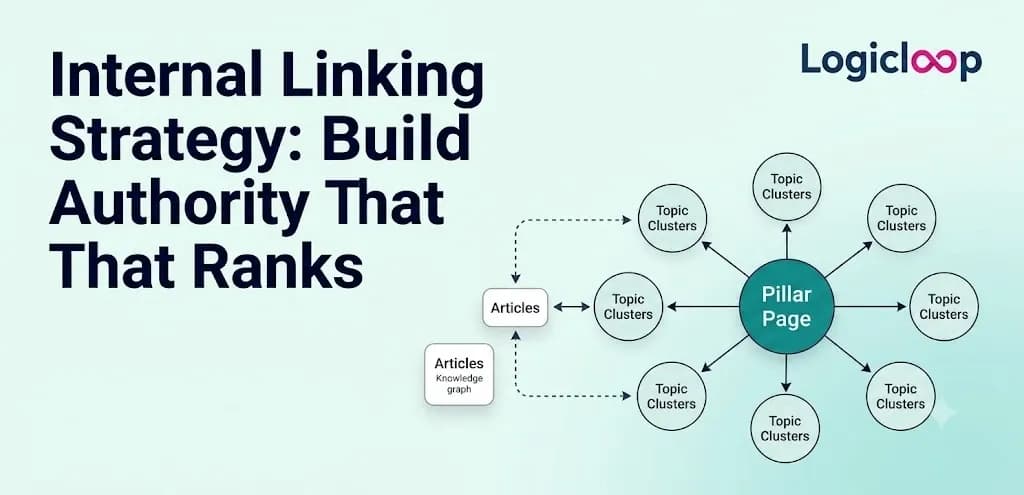
Siloing is the older, stricter approach. You organize the site into tight vertical hierarchies and mostly keep links contained within each branch, so your structure mirrors a folder tree. Topic clusters are looser and more horizontal. You build one pillar page, a broad page that overviews a whole subject, then surround it with narrower cluster pages that each go deep on one subtopic, all linking back to the pillar and, where it makes sense, sideways to each other.
Ahrefs' framework for topical authority leans hard on the pillar-and-cluster structure. And Tangence's guide is refreshingly candid that most sites do best with a hybrid. Keep enough of a silo's discipline that your navigation and URLs still make sense to a first-time visitor, but let cluster-style cross-links connect related subtopics horizontally, even when they technically live in different sections of the site.
Rigid siloing can actually work against you. If it stops you from linking two genuinely related pages just because they sit in different top-level folders, it's costing you signal for no good reason.
A Concrete Example: A Home Renovation Site
Say you run a home renovation content site and you're building authority around kitchen remodeling. Your pillar page is a thorough "Kitchen Remodel Guide" covering budget ranges, timelines, and the big decision points homeowners hit.
Around it you build cluster pages:
- "How Much Does a Kitchen Remodel Cost in [Year]"
- "Kitchen Layout Ideas for Small Spaces"
- "Choosing Countertops: Quartz vs. Granite vs. Butcher Block"
- "Permits You Need Before Starting a Kitchen Remodel"
- "DIY vs. Hiring a General Contractor"
Every cluster page links back up to the pillar guide, usually early in the piece, with anchor text that describes what the pillar actually covers. Think "our full kitchen remodel guide" rather than a bare "click here." The pillar page returns the favor, linking down to each cluster page from within its own body copy, right where that subtopic comes up.
Then you add the cross-links that make it a cluster and not just a silo. The countertops article links to the budget article, because cost obviously drives material choice. The permits article links to the contractor article, because whether you're pulling permits yourself ties directly to whether you're doing the job yourself. Those horizontal links are exactly what a strict silo model would have discouraged, and they're what separate a real cluster from a rigid folder structure.
Anchor Text: The Part People Either Ignore or Overdo
Anchor text is the clickable, visible wording of a link, and it does real work beyond just being clickable. Reach Digital's guide contrasts "learn more about commercial mortgages" against a plain "click here," and that difference isn't cosmetic. Descriptive anchor text tells the reader and the crawler what's waiting on the other end before anyone clicks.
Tangence's breakdown draws a genuine line between what helps and what backfires. Partial-match anchors, branded anchors, and long-tail natural phrases all read as normal language and hold up fine. Repeat the same exact-match keyword anchor over and over, though, and it starts to look manufactured. Generic anchors like "click here" or "read more" just waste the chance to tell Google anything at all about the destination.
The goal isn't cramming your primary keyword into every internal link on the site. It's describing, the way a person actually talks, what the linked page is about. Do that and you'll usually get natural keyword variation without forcing anything.
Pro Tip: Before you publish, skim your draft and read only the anchor text out loud, ignoring the rest. If those phrases alone give you a rough sense of where each link goes, your anchors are pulling their weight. If you hear "click here, read more, this page," you've got work to do.
How Many Internal Links, and Where They Belong
People beg for a magic number here more than almost anything else. The honest answer is that it depends on the page type, but there are sensible ranges worth knowing.
| Page type | Rough internal link range | Why |
|---|---|---|
| Blog post | ~5–10 contextual links | Room to connect related ideas without clutter |
| Service / product page | ~3–5 links | Leaner, focused on conversion |
| Homepage | ~10–15 links | Built to route traffic broadly |
| Pillar page | ~20–30 inbound links | It's a hub; clusters point up into it |
Those figures come from Tangence's guidance, with one refinement worth flagging. Reach Digital is more conservative for supporting articles, pointing toward two or three genuinely relevant internal links rather than papering the page. And pillar pages sit at the far end because they're meant to be hubs; Tangence notes they often accumulate twenty to thirty internal links pointing in from the cluster content beneath them.
None of these are targets to hit mechanically. A 600-word post straining to fit ten internal links reads like a link directory, not an article. The count should follow from how many genuinely relevant pages you actually have, not the other way around.
What It Looks Like When It's Working
Ahrefs cites a Healthline article that ranked for roughly 2,500 keywords on Google and turned up in 473 AI Overviews. That's an example of what sustained topical depth plus internal linking can eventually produce.
Notice the word "eventually." Ahrefs is honest about pacing: building topical authority in a competitive space typically takes something like six to twelve months before you see significant movement, not six weeks. Anyone promising overnight results from a linking overhaul isn't describing how this actually works.
There's a faster signal worth watching for, though. Spresso Studio's case study describes a site that saw a 24% jump in organic traffic to its Level 2 and Level 3 category pages after it restructured internal linking so higher-level pages pushed more equity down to those deeper ones. That kind of result shows up in months, not the better part of a year, mostly because it's a matter of exposing pages that were starved of internal signals in the first place.
Common Mistakes That Quietly Undercut Everything
A handful of patterns show up again and again on sites that have good content but a weak internal linking strategy. None of them look dramatic. All of them leak ranking potential.
1. Publishing New Content and Never Circling Back
Most teams link forward, from the new post to old cornerstone content, but rarely loop back to add a link from the old post into the new one. Over a year of publishing, that leaves you with a stack of one-directional links and orphaned older content that never benefits from anything you post after it.
2. Treating Navigation as the Whole Job
Menus, footers, and sidebars don't satisfy the internal linking job on their own. Tangence's typology of link types, navigational, contextual, breadcrumb, and footer, is a good reminder that contextual links carry more topical signal than a footer link that appears identically on every page.
A footer link says "this exists somewhere on our site." A link dropped into the middle of a paragraph about countertop costs says "this specific claim connects to this specific other page." The second one is a far stronger relevance signal.
3. Confusing Volume With Relevance
Once people grasp that internal links help, the temptation is to add them everywhere, to every vaguely related page they can think of. Gofishdigital frames topical authority as depth across "all angles" of a subject, which is instructive here. What builds authority isn't a high raw count of links; it's whether each link reflects a genuine, sensible relationship between two pieces of content. A reader or crawler following your links should land somewhere that makes sense given where they started.
How to Audit the Internal Linking You Already Have
If you're working with an existing site rather than building from scratch, the smart first move isn't writing new content. It's mapping what's already there. Run through this before you write a single new word:
- Pull a full list of your published pages
- Group them by subject or theme
- Flag pillar candidates: pages broad enough to anchor a cluster
- Flag orphans: pages nothing on the site currently links to
- Note high-traffic pages that could push equity down to thinner ones
- Check that newer and thin pages link up to a relevant hub
Tools like Screaming Frog or Ahrefs' site audit will surface orphaned pages for you directly. On a smaller site, a manual crawl through your CMS does the same thing.
The Fix Is Mostly Editing, Not Writing
Once you've got that map, here's the step-by-step:
- Go into your existing high-traffic or high-authority pages and add contextual links down into related pages that are thin on internal signal.
- Go into your thin, newer, or orphaned pages and make sure each one links up to whatever pillar or hub covers its broader subject.
- Add the horizontal cross-links between genuinely related cluster pages.
- Fix or replace any lazy anchor text you find along the way.
This single pass, done properly across a site with a real content backlog, tends to surface more ranking movement than most people expect from something that involves zero new writing. It's the highest-impact afternoon in SEO that nobody wants to spend.
Frequently Asked Questions
What is an internal linking strategy?
It's a deliberate plan for how the pages on your own site link to each other, so that both search engines and readers can follow the relationships between your content. Done well, it builds a readable hierarchy and signals which subjects you cover in depth.
How does internal linking build topical authority?
Topical authority comes from covering a subject from many angles with depth and accuracy. Internal links are what tie those angles together, showing Google that your related pages form one coherent body of expertise instead of scattered, disconnected posts.
Is topical authority the same as domain authority?
No. Domain authority reflects overall site strength, while topical authority is subject-specific. As Conductor's research notes, a site can be strong overall and still read as a dabbler on a topic it's barely covered.
What is an orphan page?
It's a page with no internal links pointing to it. According to Tangence, orphan pages are almost invisible to Google, because nothing on your site signals that the page exists, what it's about, or why it matters.
Should I use siloing or topic clusters?
For most sites, a hybrid works best. Keep enough of a silo's structural discipline that your navigation makes sense, but allow cluster-style horizontal links between related pages even when they sit in different sections. Rigid siloing can block links you actually want.
What's a pillar page?
A pillar page is a broad, thorough page that overviews an entire subject. It acts as a hub: narrower cluster pages link up to it, and it links back down to each of them, forming a connected topic cluster.
How many internal links should a blog post have?
Tangence suggests blog posts typically carry around five to ten contextual links, service pages three to five, and homepages ten to fifteen. These are ranges, not quotas. Let the number follow from how many genuinely relevant pages you have, not from a target.
What kind of anchor text works best?
Descriptive, natural phrasing that tells the reader what's on the other end of the link. Partial-match, branded, and long-tail anchors read well; repeated exact-match keywords look manufactured, and "click here" wastes the opportunity entirely.
How long does it take to see results from internal linking?
Building topical authority in a competitive space usually takes six to twelve months, per Ahrefs. That said, restructuring links to feed starved deeper pages can produce faster wins. Spresso Studio documented a 24% organic traffic jump to deeper category pages within months.
Can internal linking fix bad content?
No. A well-linked page on a topic you don't genuinely understand still won't rank, and no amount of linking rescues thin or outdated pages. Internal links surface good content; they don't manufacture it.
Final Thoughts
None of this replaces good writing. A perfectly wired article about a subject you don't actually understand still won't rank, and no linking strategy rescues thin, inaccurate, or stale pages. That part is non-negotiable.
But content without deliberate internal linking is leaving its own best evidence unread. You did the work, covered the subject, earned the expertise, and then hid the proof by never connecting the pieces. The links are how you show your work.
If your site is sitting on a backlog of solid content that isn't pulling its weight, an internal linking audit is the place to start, and it's exactly the kind of high-impact, low-glamour project the team at Logicloop can help you map and execute. Start with the wiring. The rankings tend to follow.